๐Ÿ—ƒ๏ธ Revision Management

Always know which sheets are current.

On a fast-moving project, the "current" set is scattered across a permit issue, two addenda, and three ASIs โ€” and nobody has time to track down which revision of E2.11 is actually the latest. Latest Full Set Builder scans your entire revision history, picks the newest version of every sheet automatically, and assembles a clean, complete set in a dated output folder. Run it after every issue and always know exactly where the latest sheets live.

โœ“ Scans all revisions to find the newest version of every sheet
โœ“ Assembles a complete current set automatically
โœ“ Shows which revision each sheet came from
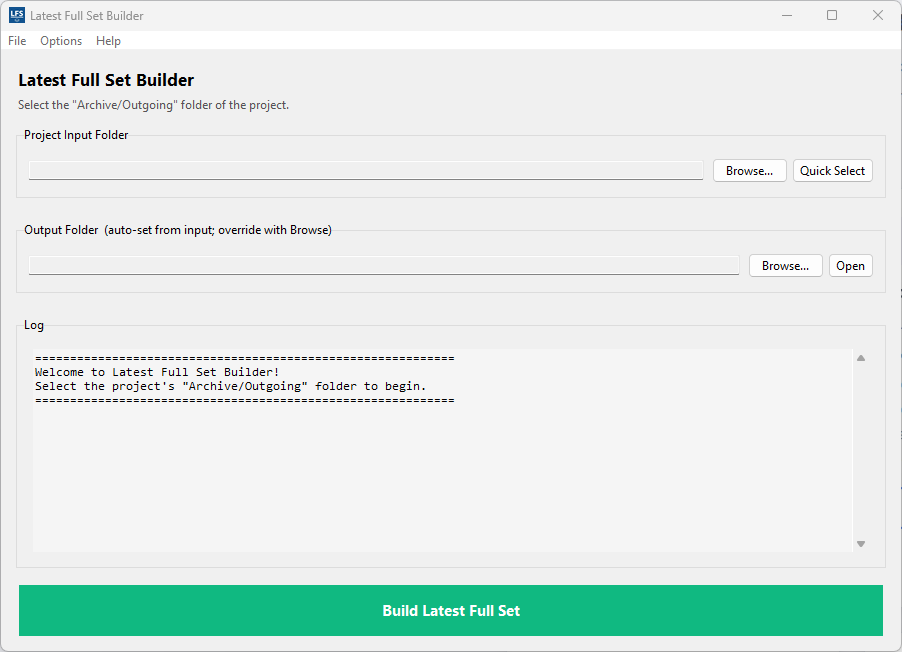
Latest Full Set Builder Interface

The Problem

On any active project with multiple issue dates, addenda, or ASIs, the "current" drawing set is a moving target. The permit set had 180 sheets. Addendum 1 revised 23 of them. ASI-3 revised 6 more. Bulletin 2 revised 4. Now someone needs "the current E2.11" and the answer isn't obvious โ€” is it in the permit set, Addendum 1, or one of the later issues?

The research never ends. The PM needs a current set for the contractor. The architect needs one for coordination. The building department asks for an updated submittal. Every request means checking three or four folders to figure out which version of each sheet is the newest. Multiply this by 200 sheets and every request becomes a research project that takes 30 minutes of careful cross-checking.

And the real risk isn't lost time โ€” it's sending a superseded sheet. You accidentally include E2.11 from the permit set when Addendum 1 revised it. The contractor builds to the wrong detail. The mistake isn't discovered until framing inspection.

Latest Full Set Builder eliminates this entire problem. Point it at your project folder, and it scans all subfolders to find every version of every sheet. The tool picks the newest version automatically and assembles a clean, complete current set in a dated output folder. Run it after every issue event and always know exactly which sheets are current.

How It Works

1

Point to your project folder

Select the root folder where your revision history lives โ€” permit set, addenda, ASIs, bulletins, change orders. The tool scans all subfolders automatically.

2

Review the sheet manifest

The tool identifies every unique sheet number across all revisions and shows you which version is newest for each one. See which revision each sheet came from, and verify the logic before proceeding.

3

Build the latest set

A clean, complete set containing the newest version of every sheet is assembled in a dated output folder. That folder becomes your single source of truth for the current drawings until the next issue is released.

Key Features

๐Ÿ”

Comprehensive Scanning

Scans all subfolders to find every version of every sheet number. Works regardless of folder naming or organization โ€” finds sheets in permit sets, addenda, ASIs, and bulletins automatically.

๐Ÿค–

Automatic Newest Selection

Picks the newest version of each sheet number automatically. No manual review needed unless you want to verify the logic โ€” the tool gets it right.

๐Ÿ“‹

Manifest Report

Shows the sheet manifest before building โ€” every unique sheet number, which revision it came from, and the reasoning. Full transparency on what the tool will assemble.

๐Ÿ“…

Dated Output Folder

Output is saved in a dated folder โ€” "Latest Set 2026-03-15" โ€” making it clear when the set was assembled and avoiding overwrites if you build multiple times.

๐Ÿข

AEC Sheet Number Support

Works with any AEC sheet numbering convention โ€” understands A1.01, E2.11A, M4.1.1, and all standard discipline/sequence formats.

โœ“

Reusable Process

Run the tool after every issue event. Each run creates a new dated output folder. No need to manually manage revision history โ€” always know where the latest set lives.

Stop chasing which sheets are current.

Try Latest Full Set Builder free for 30 days. No credit card required.

Start Free Trial